Photo composition: check the edges before the grid
Make clearer compositions by choosing a subject, checking background collisions and comparing two deliberate frames.
ShotAgain editorial · 3 min read

Quick answer
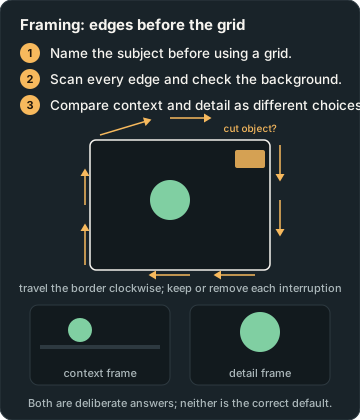
- Name the subject before using a grid.
- Scan every edge and check the background.
- Compare context and detail as different choices.
Before turning on a composition grid, finish this sentence: “This picture is about…” A person waiting under an umbrella is a clearer starting point than “the street”. Once you know what matters, the frame becomes a set of choices about what belongs around it. This approach works with a phone, a compact camera or an interchangeable-lens camera because the first adjustment is often where you stand.
Decide what the surroundings contribute
Look at the subject and then the surrounding scene. Does the background explain the place, create a useful contrast, or simply compete for attention? A busy frame can suit a busy market. A quiet background can suit a small detail. Neither needs to be forced into the other style.
Adobe's composition guide explains grids, balance and negative space, while stressing that compositional tools guide decisions rather than replace them. Use a thirds grid to test an arrangement, not to prove a photo is correct. A centred frame can be a deliberate answer when symmetry or a direct connection is the point.
Walk around the edge
Before you press the shutter, scan the four borders of the preview. Start at the top left and travel clockwise. Look for half an object, a bright fragment, a cut hand, or a pole that seems to grow from someone's head. Decide whether each interruption adds anything. Moving a little may solve a background collision without removing the setting.
Now check just behind the subject. A light shirt against a pale wall may need a different viewpoint to separate the outline. That is a framing decision before it is a camera-setting decision. Try lowering or raising the camera enough to change the background, then check the subject's proportions again. There is no universally flattering camera height for every person, object and intended story.
Leave space for a reason
Space around a subject can give a gaze, gesture or movement somewhere to go. It can also feel lonely, expansive or tense. Take one frame with more room in front of the subject and another with less. Ask which better describes your intention. Avoid instructing a person to stand in a dangerous place just to complete a line or pattern.
For an object, inspect the relationship between its outline and the border. A cup handle just touching the frame can feel accidental; a clear gap or a confident close crop may read more deliberately. Test it rather than relying on a rule about how much space every object needs.
Make two different answers
Find a chair beside a doorway, a bicycle against a wall, or another static subject you can photograph safely. Take picture A to show its surroundings. For picture B, move or reframe to emphasize one detail. Do not call one the failed picture. They answer different questions: where is it, and what should I notice about it?
Review the pair at the same displayed size. Cover the captions for a moment and describe what each picture communicates. Then check the edges again. If the tighter picture removes useful context, consider a third frame between the two. If the wider picture has a distracting bright corner, move the camera instead of assuming a later crop must rescue it.
Compare like with like
A change of viewpoint can also change light, apparent proportions and background. Keep a simple note such as “moved to the right to separate the handle from the door”. This makes the result repeatable. A zoom setting alone does not record where you stood, and the file cannot explain your intention unless you supply it.
Composition feedback is most useful when it names a visible relationship: the edge cuts a finger, the background merges with the subject, or the empty area supports the gaze. “Bad composition” says little. Ask yourself for one change worth trying, take another real photograph, and keep both files so you can see whether the change served your purpose.
Compare your two photographs with ShotAgain and describe the story you wanted each frame to tell. Its suggestions can help you notice relationships; the final framing choice remains yours.
Try it: Compare context and detail
- Name what the picture is about.
- Make one context frame and one detail frame; scan their borders.
- Choose which serves the intended story, and explain why.
Record changes in light, exposure, viewpoint or subject movement; the pair is not proof of one isolated cause unless other conditions were controlled.
Sources
Put it into practice
Upload a real shot and get coaching on the decisions in it.