EXIF explained: what your photo file can tell you
Understand recorded shutter speed, aperture, ISO and dimensions, and learn why missing metadata and authenticity remain uncertain.
ShotAgain editorial · 4 min read
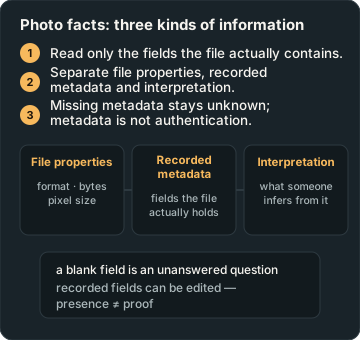
Quick answer
- Read only the fields the file actually contains.
- Separate file properties, recorded metadata and interpretation.
- Missing metadata stays unknown; metadata is not authentication.
EXIF is recorded information associated with an image file. It can help explain a photograph, but it is not a complete account of how the picture was made. Start with the original file when you have it, read only the fields actually present, and keep those recorded values separate from what someone infers by looking at the image. A blank field is an unanswered question, not permission to fill it with a plausible number.
Understand the three kinds of information
First are file properties that software can read or calculate, such as format, byte size and pixel dimensions. Second are recorded metadata fields, such as camera model or exposure time, when the file supplies them. Third are interpretations, such as “the light looks soft” or “camera movement may have contributed”. Those categories can help each other without becoming interchangeable.
CIPA's EXIF metadata document describes a tag-based metadata system for picture-taking conditions. The linked PDF is an older specification reference, not a claim that it is the latest edition. Adobe's Lightroom Classic documentation lists exposure, focal length, ISO and flash among the camera metadata fields its panel can display.
Read a few fields together
Exposure time describes a recorded capture duration. If you see 1/250 second, it supplies context for movement, not proof that every subject should be sharp. Aperture, if recorded, is expressed as an f-number. It helps you understand the capture setup, but it does not by itself tell you exactly how much of a scene will appear in focus.
ISO is another recorded camera setting, not a standalone image-quality verdict. Focal length describes a lens property and needs sensor or equivalent-format context for meaningful comparisons. Do not assume a phone's displayed zoom label is the same thing as a physical lens focal length in millimetres. Read the labels exactly as the file or software presents them.
Pixel dimensions tell you how many pixels the file contains along each side. They do not prove that all those pixels hold resolved detail. A larger file can still be blurred, heavily compressed, cropped from another file or processed in ways the metadata does not explain. Byte size is a storage quantity, not an aesthetic score.
Treat an example as an example
Imagine a teaching worksheet that lists exposure time as 1/125 second, aperture as f/4 and ISO as 800. Those are fictional practice values, not a recommended recipe and not readings from an uploaded photograph. They suggest questions: was anything moving, what needed to be sharp, and how bright was the scene? They do not answer those questions on their own.
Now imagine the same worksheet with aperture marked “not available”. The honest interpretation is that this field was not obtained from this file. Do not replace it with a value inferred from a blurred background. Several capture and processing choices can create similar appearances.
Keep the original and shared copy distinct
Compare a file kept by your camera with a copy exported or shared through an app. Note which fields your chosen viewer actually shows in each. Differences may reflect the export, sharing path or viewer support; they do not automatically establish what happened at capture. Preserve both versions with clear names if you want to repeat the comparison later.
Metadata can be edited: Adobe documents changing capture time, for example. For that reason, recorded dates and camera names are context rather than certificates of authenticity. GPS fields, when present and readable, describe recorded location data; their absence does not establish that location was never recorded elsewhere.
Use metadata to ask a better next question
If a pet's face looks soft and the file records a relatively long exposure, try a shorter exposure in another real photograph and compare. If the exposure field is missing, start with visible clues and your recollection of the scene. In both cases, a practical follow-up is more valuable than declaring a cause with certainty.
Upload an original for file facts and coaching. ShotAgain should distinguish readable metadata from visual interpretation. Supply useful context yourself, including the subject's movement and your goal, rather than expecting a file to contain your intention.
Try it: Compare file information
- Keep the original and make a clearly named shared or exported copy.
- Inspect which metadata fields the same viewer displays in each.
- List recorded, calculated and unknown information separately.
Record changes in light, exposure, viewpoint or subject movement; the pair is not proof of one isolated cause unless other conditions were controlled.
Sources
- Exif 2.31 metadata for XMP (2017 reference) — Camera & Imaging Products Association
- Metadata basics and actions in Lightroom Classic — Adobe Help
Put it into practice
Upload a real shot and get coaching on the decisions in it.