Why photos look blurry: focus, shake or subject movement?
Use visible clues and a simple repeat-shot exercise to separate focus errors, camera movement and a moving subject.
ShotAgain editorial · 4 min read

Quick answer
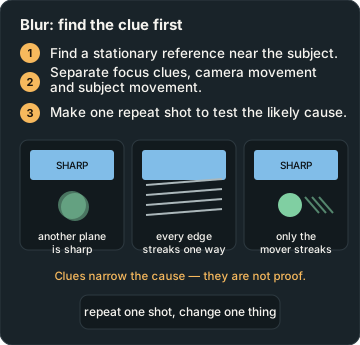
- Find a stationary reference near the subject.
- Separate focus clues, camera movement and subject movement.
- Make one repeat shot to test the likely cause.
A soft photograph does not identify its own cause. The useful first question is whether the whole scene looks smeared, only the moving subject is blurred, or a different distance appears sharp. These clues narrow the possibilities. They do not establish a diagnosis from a tiny preview. Start with the original file and inspect the area that needed to be sharp at a sensible viewing size.
Find a sharp reference
Look for a stationary detail near the subject: a chair edge, a wall sign or a plate rim. If that detail is clear while a hand or pet is streaked, subject movement is a plausible explanation. If stationary edges throughout the frame show a similar directional trail, camera movement is a possibility. If another distance is sharp while the intended subject is soft, check where focus landed.
Several things can happen together. A moving person can be outside the focus area while the camera also shakes. Compression, heavy processing or a low-resolution copy can further obscure the clues. Describe what you see before deciding what caused it. “The lettering behind the face is sharper” is more useful than “the autofocus is broken”.
Match the change to the problem
Adobe's shutter-speed explanation describes how a shorter exposure can freeze movement and a longer one can record it. The necessary duration depends on the subject and how it moves through the frame. There is no one shutter speed that guarantees a sharp photograph of every child, bird or football match.
If movement is the likely cause and you can choose shutter speed, try a shorter exposure and inspect the next frame. The camera may need a different aperture, ISO or more light to maintain the brightness you want. If you are using a phone without those controls, try a brighter location, a steadier position, or a moment when the subject pauses. Check the actual result instead of assuming a mode name promises sharpness.
For a likely focus miss, select the important detail using your camera's available controls and make another attempt. If the subject moves toward you, a focus setting suited to moving subjects may help; check your model's instructions. A tripod or stable support addresses camera movement, but it does not stop a person moving during the exposure.
Run a static-subject check
Choose an object with clear printed detail and place it in good light. Clean the lens surface carefully if it is visibly marked, following the device maker's guidance. Take a photograph from a comfortable distance, select the printed detail for focus, and keep the camera steady. Then take a second photograph with additional support.
Inspect the same letters in both files. If the supported version is clearer, camera handling may have contributed. That result does not rule out other causes in yesterday's different scene. If neither version is clear, check that you are not closer than your equipment can focus, then try a little farther away. Keep the experiment simple rather than changing every setting together.
Test movement separately
Next, photograph a moving hand beside the stationary object. Keep the stationary object visible as your reference. Try another frame with a shorter exposure if your equipment allows it, or repeat the action in brighter light. Look separately at the hand and the lettering. This comparison teaches you to recognize different patterns instead of treating every kind of softness as the same fault.
Do not copy a demonstration's exposure values as a prescription. Record the values your file actually contains and any changes you deliberately made. An absent shutter-speed field remains unknown. Neither the image nor an AI interpretation can reliably reconstruct every missing capture setting.
Decide whether blur matters
Motion can be part of the picture: moving water, a passing cyclist or a gesture may benefit from it. Judge the effect against your purpose and the size at which the photograph will be used. If an important eye is unreadable in a portrait, that is a concrete issue to work on; an intentionally soft background may be doing exactly what you wanted.
Analyze an original photograph with ShotAgain for text feedback. Include what was moving and what you wanted sharp, so a possible explanation is not mistaken for a confirmed cause.
Try it: Test a blur clue
- Photograph printed detail steadily in good light.
- Repeat with support, then try a moving hand beside the static detail.
- Compare stationary edges and moving detail separately.
Record changes in light, exposure, viewpoint or subject movement; the pair is not proof of one isolated cause unless other conditions were controlled.
Sources
Put it into practice
Upload a real shot and get coaching on the decisions in it.